

Download Link


MEGA888 download: Android, iPhone and Windows
Three platforms, three different files. Pick the one that matches your device — installing the wrong package is the single most common reason a MEGA888 install fails, and the error message it produces tells you almost nothing.
What you are downloading
This is the signed release as issued by the operator. We are a distribution portal, not the game operator — we do not build MEGA888, run its servers, or influence its outcomes. What we control is which file we serve and how accurately we describe it.
That distinction matters because of what is actually risky here. The MEGA888 client itself is not the danger. Repackaged copies circulating on mirror sites are: same icon, same splash screen, and an extra permission request the genuine client has never made. Those are the builds that cause problems, and they are indistinguishable from the real thing until you look at what you installed.
So every figure above is published for you to check against: version number, file size, minimum OS, release date. If what lands on your phone does not match, you did not get it from here.
| Your device | File | Size | Minimum OS | Install via |
|---|---|---|---|---|
| Android phone or tablet | mega888.apk | 48.2 MB | Android 8.0 | Any browser |
| iPhone or iPad | mega888.plist | 52.6 MB | iOS 14 | Safari only |
| Windows laptop or desktop | mega888-setup.exe | 112 MB | Windows 10 | Any browser |
The iOS row says Safari only for a reason. Enterprise profiles cannot be installed from Chrome, Firefox, or the in-app browsers inside WhatsApp, Telegram and Facebook. If you reached this page from a chat link on an iPhone, copy the address into Safari before tapping anything. This single step accounts for most failed iOS installs we hear about.
Step by step
Installing MEGA888
Under two minutes on Android, about three on iPhone. The order matters more than the speed.
APK install
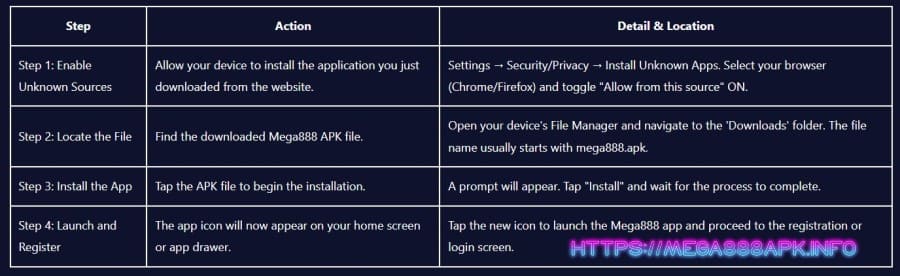
- Tap the Android button above. Your browser saves the file to Downloads. Chrome may warn that APK files can be harmful — that warning appears for every sideloaded file.
- Enable Install Unknown Apps for your browser under Settings, Security. On Android 12 and newer this is per-app, so enabling it for Chrome affects nothing else.
- Run the file from Downloads. Play Protect scans it automatically — let that finish rather than cancelling.
- Sign in with your agent-issued ID, then switch the Unknown Apps permission back off. The app keeps working.
Profile install
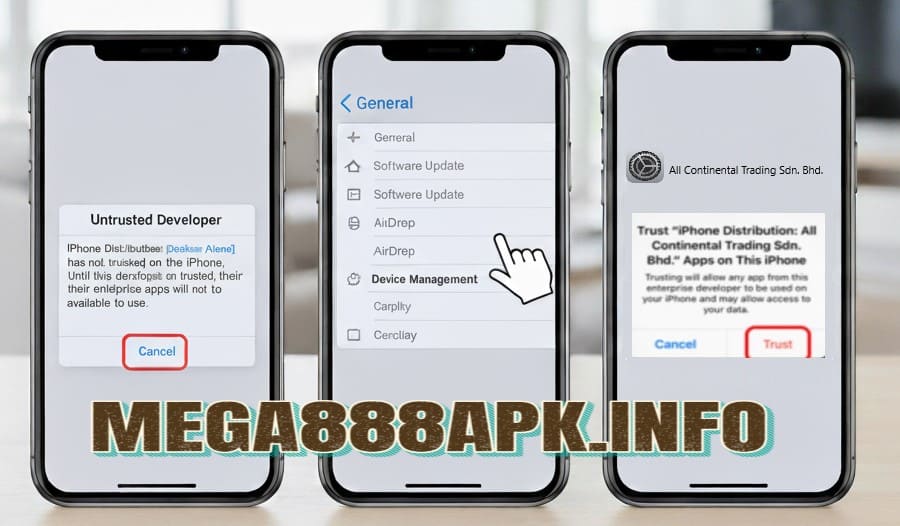
- Open this page in Safari first. No jailbreak is involved at any point — this is a standard configuration profile.
- Tap the iOS button and confirm the pop-up. The icon appears on your home screen greyed out, which is expected.
- Trust the certificate under Settings, General, VPN & Device Management. On older iOS builds this section is called Profiles & Device Management.
- Tap Trust. The icon turns solid. You repeat this only after a fresh install or a certificate rotation.
Desktop install
- Download the installer. Windows may ask whether to keep the file — choose Keep.
- Approve SmartScreen. Click More info, then Run anyway. This appears for any installer distributed outside the Microsoft Store.
- Complete setup. The default install location is fine for most machines.
- Sign in with the same ID as your phone. Balance and progress are shared — one session at a time.
Do this after installing
Check you got our file
- Open the app's settings and find the version number. It should read 1.2.9. Anything older means you installed from a mirror, not from here.
- Check the app size under Settings, Apps on Android. Around 48 MB is right; a substantially different figure is worth questioning.
- Review the permissions the app requested. MEGA888 does not need SMS access. If something asked for it, uninstall and start again from this page.
- Compare RTP in-game against the figures on our RTP page. The game's own info screen is the authoritative source — if it disagrees with any website, including ours, believe the game.
When the install goes wrong
Five problems account for almost every message our agents receive. All five have fixes that take under a minute, and none require starting from scratch.
| What you see | Why it happens | Fix |
|---|---|---|
| “App not installed” | An older MEGA888 build is still present with a different signature | Uninstall the old app first, then run the new APK |
| “Untrusted Enterprise Developer” | Profile installed but never trusted | Settings › General › VPN & Device Management › Trust |
| iOS icon vanished overnight | Apple revoked the signing certificate — routine, not a compromise | Delete the app, reinstall from this page in Safari, trust again |
| Stuck on the loading screen | Usually a carrier DNS issue on Malaysian mobile data | Switch to Wi-Fi, or restart the app once on mobile data |
| Login rejected on a correct password | Trailing space from copy-paste, or a session open on another device | Retype the password by hand; sign out of the other device |
If none of these match, message the agent who issued your ID rather than reinstalling repeatedly. Reinstalling does not fix an account-side problem, and repeated failed logins can trigger an automatic lock that then needs the agent anyway.
What we can and cannot promise
What we check
Each build is sourced through our agent relationship rather than a public mirror, scanned before publication, and installed on real handsets including older Android 8 and 9 devices. The version, size and date are then published here.
What that guarantees
That the file you download from this page is the file the operator released. That is a meaningful thing to be able to say, and it is also the limit of it.
What it does not
Nothing about your odds, your outcomes, or whether you will enjoy playing. And no one can honestly claim a system with zero vulnerabilities — a site promising that is describing marketing, not security.
On encryption. Login and transaction data move over 128-bit SSL, which is standard for this class of application. It protects the session between your phone and the game server. It is a baseline requirement rather than a distinguishing feature, and your data is not anonymised — your agent knows who you are, which is how withdrawals work at all.
Corrections
Three things this page used to say
All three appeared here in an earlier version. They are wrong, they cost readers money, and removing them quietly would have been the easier option.
There is no temperature. Each spin is generated independently of every spin before it, so fifteen demo spins tell you nothing about the sixteenth, and nothing at all about a later real-money session. A Test ID is genuinely useful for three things: checking the app runs on your handset, learning the controls, and deciding whether you enjoy a title. Reading the machine is not one of them.
There are no phases. A random number generator has no memory, no counter filling toward a payout, and no state it progresses through. Having enough balance for a longer session buys you playing time, which is a fine reason to manage a bankroll — but it does not move you toward a jackpot. Because the expectation is negative on every spin, a longer session converges toward the theoretical loss rather than away from it.
No such statistic exists, and no server produces one. Outcomes do not vary by hour, day, or proximity to a maintenance window. This claim is the most expensive of the three precisely because it is specific — a stated time range sounds like it came from data, and people schedule their evenings around it. The only thing that peaks between 8pm and 11pm is the number of people playing.
Why leave this section up. We could have deleted those lines and said nothing. But the same claims are on most competing MEGA888 pages, and someone arriving here has probably read them elsewhere. Naming them is more useful than quietly removing them — and it tells you what to do when you see them on the next site.
Before you deposit anything
Decide what you are willing to lose before you open the app, and stop there whether you are up or down. Never raise your stake to recover a loss — that impulse turns a bad evening into a serious one, and it is the single most common way people overrun what they intended to spend. Gambling is entertainment with a cost attached; it is not income, and no strategy, timing trick or platform changes that arithmetic. Our agents can freeze an account on request, and our responsible gaming page lists the support services available in Malaysia.
Need an ID first?
MEGA888 has no self-service signup. An agent issues your credentials, usually within a few minutes, and stays attached to your account for deposits and withdrawals.
Start the MEGA888 registration process here · Request a free Test ID · Check published RTP figures
Build v1.2.9 · 48.2 MB · released 6 August 2026 · last reviewed 6 August 2026
FAQ
If you are using an Android phone (e.g., Samsung, Huawei), you must download the MEGA888 APK file. If you are using an iPhone or iPad, you must download the iOS file.
Your phone is blocking the file because it is downloaded from a secure third-party source, not the Play Store. You must temporarily enable "Install Unknown Apps" or "Unknown Sources" in your phone's security settings to proceed.
This official download page is always updated with the latest MEGA888 version. Downloading from here ensures you have the most secure and stable file with all recent game updates.
No. After downloading the app, you still need to contact an official agent via WhatsApp or Telegram to receive a unique user ID and password to complete your MEGA888 register process.
Go to your device's Settings > General > VPN & Device Management, find the relevant profile, and tap "Trust". This verifies the app and allows it to open.
The specific file type required for a MEGA888 download on an Android smartphone is the APK (Android Package Kit) file. This is the standard executable package for installing apps outside of the Google Play Store.
To download the official MEGA888 app using a QR code, you simply open your phone’s camera or a QR scanning app and point it at the relevant code (Android or iOS). Your phone will automatically redirect you to the direct, secure download link.
You can check the version number within the app's settings or compare the app's listed version number against the latest MEGA888 version published on the official download page. If the numbers do not match, you should download and install the update.
The main security risk of not using the official link is downloading a modified or unofficial MEGA888 APK that could contain malware, viruses, or keyloggers, compromising your device and personal data.
No, there is no separate link. The same MEGA888 APK file works perfectly for both Android phones and tablets, and the same iOS file works for iPhones and iPads. The application scales automatically based on your device's screen size.